A hybrid approach for procedural planets
Part 2 :- Bump mapping
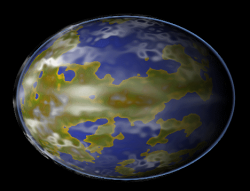
Bump mapping is one reason we cannot do the whole process in a single shader, you cannot generate a normal for a single point.
Actually creating a normal map for your planet from a height map is a trivial task. It is well documented all over the interweb so I can safely skim over it with little explanation.
We just add the following code to our generate code in Planet.cs
Actually creating a normal map for your planet from a height map is a trivial task. It is well documented all over the interweb so I can safely skim over it with little explanation.
We just add the following code to our generate code in Planet.cs
	Color[] Map = new Color[512 * 512];
            mercator.GetData<Color>(Map);

            normalmap = new Texture2D(graphics, 512, 512, 1, TextureUsage.None, SurfaceFormat.Color);
            Color[] pixels = new Color[512 * 512];
            Color c3;


            for (int y = 0; y < 512; y++)
            {
                int offset = y * 512;
                for (int x = 0; x < 512; x++)
                {

                    float h0 = (float)Map[x + (512 * y)].R;
                    float h1 = (float)Map[x + (512 * safey(y + 1))].R;
                    float h2 = (float)Map[safex(x + 1) + (512 * y)].R;

                    float Nx = h0 - h2;
                    float Ny = h0 - h1;

                    Vector3 Normal = new Vector3((float)Nx, (float)Ny, (float)Nz);
                    Normal.Normalize();
                    Normal /= 2;

                    byte cr = (byte)(128 + (255 * Normal.X));
                    byte cg = (byte)(128 + (255 * Normal.Y));
                    byte cb = (byte)(128 + (255 * Normal.Z));
                    c3 = new Color(cr, cg, cb);
                    pixels[x + (y * 512)] = c3;
                }
            }

            normalmap.SetData(pixels);
safex and safey just make sure that the same point is within the array by wrapping the coordinate around, look in the supplied source if you are not sure what I mean.
The normal map generated should look something like this.
The normal map generated should look something like this.
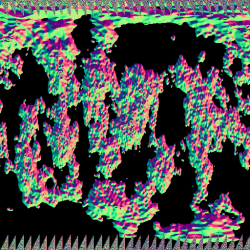
This is very harsh, big differences across the texture. Why?
Well I have added a public variable Nz to the code. It is basically the size of your sample grid.
By default this is zero, so you get very powerful variations in the bump map. This variable is very useful for controlling the strength of the bump mapping.
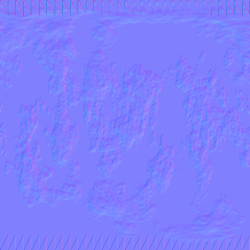
It should be setup in the derived class, in this case WaterPlanet. Play around with different values but a value of 128 produces this result.
Well I have added a public variable Nz to the code. It is basically the size of your sample grid.
By default this is zero, so you get very powerful variations in the bump map. This variable is very useful for controlling the strength of the bump mapping.
It should be setup in the derived class, in this case WaterPlanet. Play around with different values but a value of 128 produces this result.
Now we have to add bump mapping to our render code. The first thing to remember is that bump mapping requires tangents.
Thankfully this is also trivial, in the content project click on your sphere model.
Open the content processors sub panel in the properties window and turn 'generate tangent frames' to true.
So now we need to make some changes to our shader. The vertex shader becomes this.
Thankfully this is also trivial, in the content project click on your sphere model.
Open the content processors sub panel in the properties window and turn 'generate tangent frames' to true.
So now we need to make some changes to our shader. The vertex shader becomes this.
VertexShaderOutput VertexShaderFunction(VertexShaderInput input)
{
   VertexShaderOutput output = (VertexShaderOutput)0;

	output.Position = mul(input.Position,wvp);

	float3x3 worldToTangentSpace;
	worldToTangentSpace[0] = mul(input.Tangent,world);
	worldToTangentSpace[1] = mul(cross(input.Tangent,input.Normal),world);
	worldToTangentSpace[2] = mul(input.Normal,world);

	output.Light = mul(worldToTangentSpace,LightDirection);

	output.TexCoord = input.TexCoord;

	return output;
}
We build a world to tangent space matrix use that to create our new light vector.
Not going to tax the GPU much there.
We also need a new texture sampler which I called BumpMap (and remember to set it up in
the draw method ) then we just need a minor change to the pixel shader which becomes
this.
Not going to tax the GPU much there.
We also need a new texture sampler which I called BumpMap (and remember to set it up in
the draw method ) then we just need a minor change to the pixel shader which becomes
this.
float4 PixelShaderFunction(VertexShaderOutput input) : COLOR0
{
	float4 output = float4(0,0,0,0);

	float3 Normal = (2 * (tex2D(BumpMapSampler,input.TexCoord))) - 1.0;

	float3 LightDir = normalize(input.Light);
	float Diffuse = saturate(dot(LightDir,Normal));

	float4 height = tex2D(ColorMapSampler,input.TexCoord);
	float4 texCol = tex2D(PallSampler,float2(0,height.x));

	texCol *= Diffuse;

	output =  AmbientColor + texCol;
    return output;
}
And viola! Bump mapped planet.
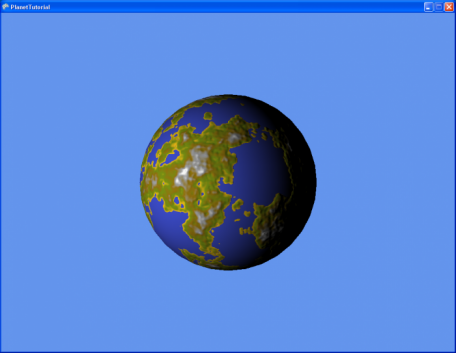
Play around with Nz and see the effect it has on the render.
That's it for part two, in the next page we start adding new planet types.
That's it for part two, in the next page we start adding new planet types.

| part2.zip |
